Connect Fireflies to analyze your meeting recordings with AmpUp
Connect Fireflies.ai to AmpUp to import your meeting recordings, transcripts, and AI-generated insights. AmpUp’s AI agents will analyze your sales conversations to provide personalized coaching and help your team close more deals.
Fireflies uses API key authentication for a straightforward setup process.
1
Generate API Key in Fireflies
Log into your Fireflies.ai account and navigate to Settings → Integrations → Fireflies API.Click Generate API Key and copy the key.
Store your API key securely - it provides full access to your Fireflies data. You’ll need this to connect to AmpUp.
2
Navigate to Integrations in AmpUp
In AmpUp, go to Settings → Integrations → Fireflies.
3
Enter Provider Credentials
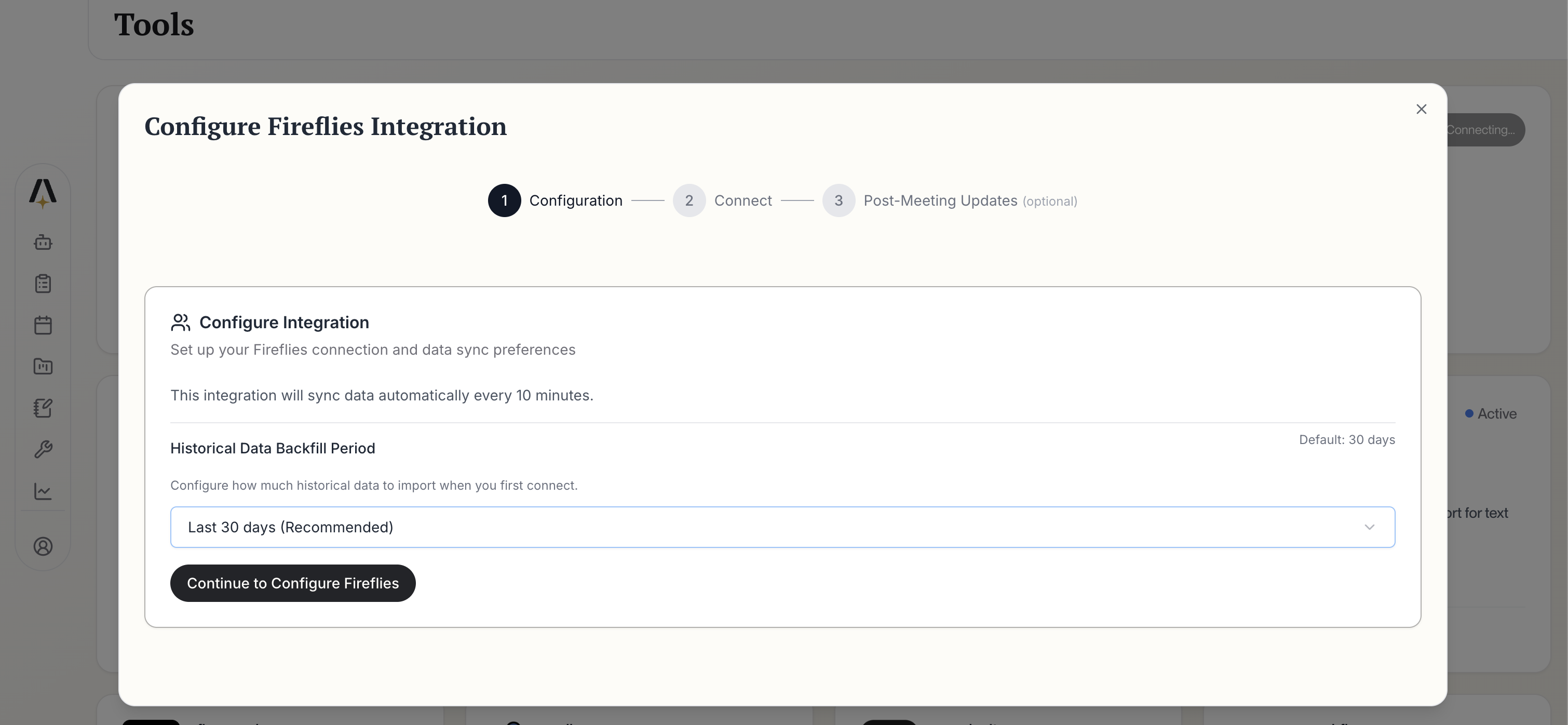
Click Connect Fireflies. AmpUp will prompt you to enter the API Key you generated from Fireflies. AmpUp securely stores this credential and uses it to access your Fireflies data.Configure your integration preferences:
Fireflies Configuration
Historical Data Backfill Period: Choose how far back to import (default: 30 days recommended)
Data syncs automatically every 10 minutes after initial setup
Click Continue to Configure Fireflies to proceed.
4
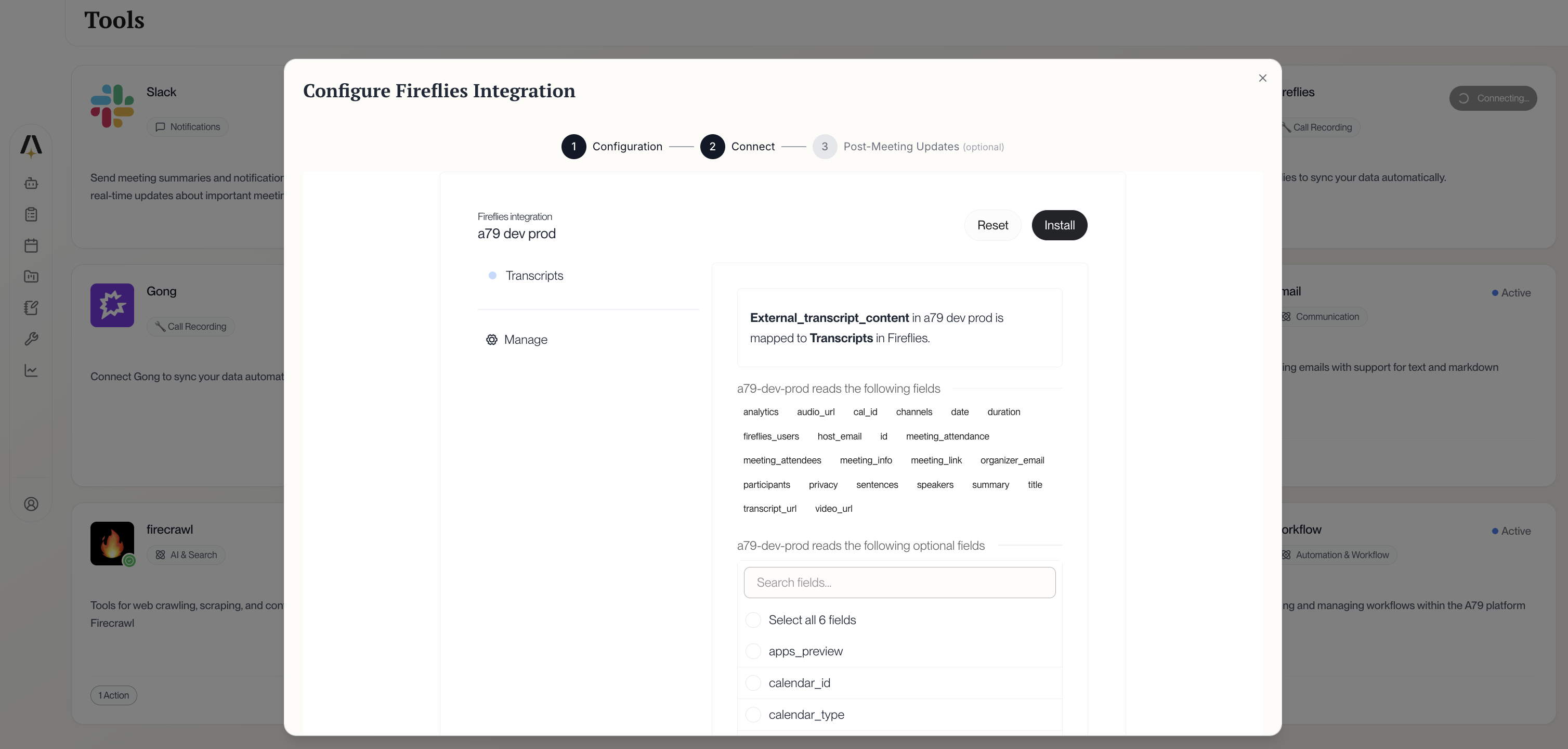
Review Field Mapping
Review which Fireflies data fields will sync to AmpUp:
How does Fireflies compare to other conversation tools?
Fireflies is one of the most popular AI meeting assistants with 20M+ users and a generous free tier (800 min/month). It works alongside enterprise tools like Gong and Clari Copilot. AmpUp adds personalized coaching on top of any conversation intelligence platform.
Can I connect multiple conversation intelligence tools?
Yes, but we recommend connecting only one to avoid duplicate meetings and confusion. AmpUp deduplicates based on meeting time and participants, but using a single source is cleaner.
What platforms does Fireflies support?
Fireflies works with Zoom, Google Meet, Microsoft Teams, Webex, RingCentral, Aircall, and many other platforms. Any platform Fireflies can join, AmpUp can analyze.
How quickly do new meetings appear in AmpUp?
New meetings typically appear within 15-30 minutes. Fireflies processes most meetings within 2-10 minutes of the call ending, then AmpUp imports the data.
Does AmpUp replace Fireflies?
No. Fireflies continues to record, transcribe, and summarize your meetings. AmpUp adds a coaching layer by analyzing those conversations to provide personalized feedback and training for your sales reps.
Can I regenerate my API key?
Yes. Generate a new API key in Fireflies settings, then update it in AmpUp’s integration settings. The old key will stop working once revoked.
What happens if I hit my Fireflies minute limit?
If you hit your monthly transcription limit on a free plan, new meetings won’t be transcribed until the next billing cycle. Consider upgrading to a paid Fireflies plan for unlimited transcription.
Does Fireflies' 'Talk to Fireflies' feature work with AmpUp?
Fireflies’ Perplexity-powered search feature is separate from the transcription data that syncs to AmpUp. AmpUp focuses on the core transcript and analytics data for coaching purposes.