Set up the AmpUp Notetaker to automatically record, transcribe, and analyze your meetings
The AmpUp Notetaker joins your meetings automatically, records them, and provides AI-powered analysis — coaching insights, action items, and meeting summaries — all without any manual effort.
An AmpUp admin enables the Notetaker for your organization. Once enabled, every user in the org can connect their calendar and start using it.
If you don’t see the Notetaker option in your settings, ask your AmpUp admin to enable it for your organization.
2
Connect your calendar
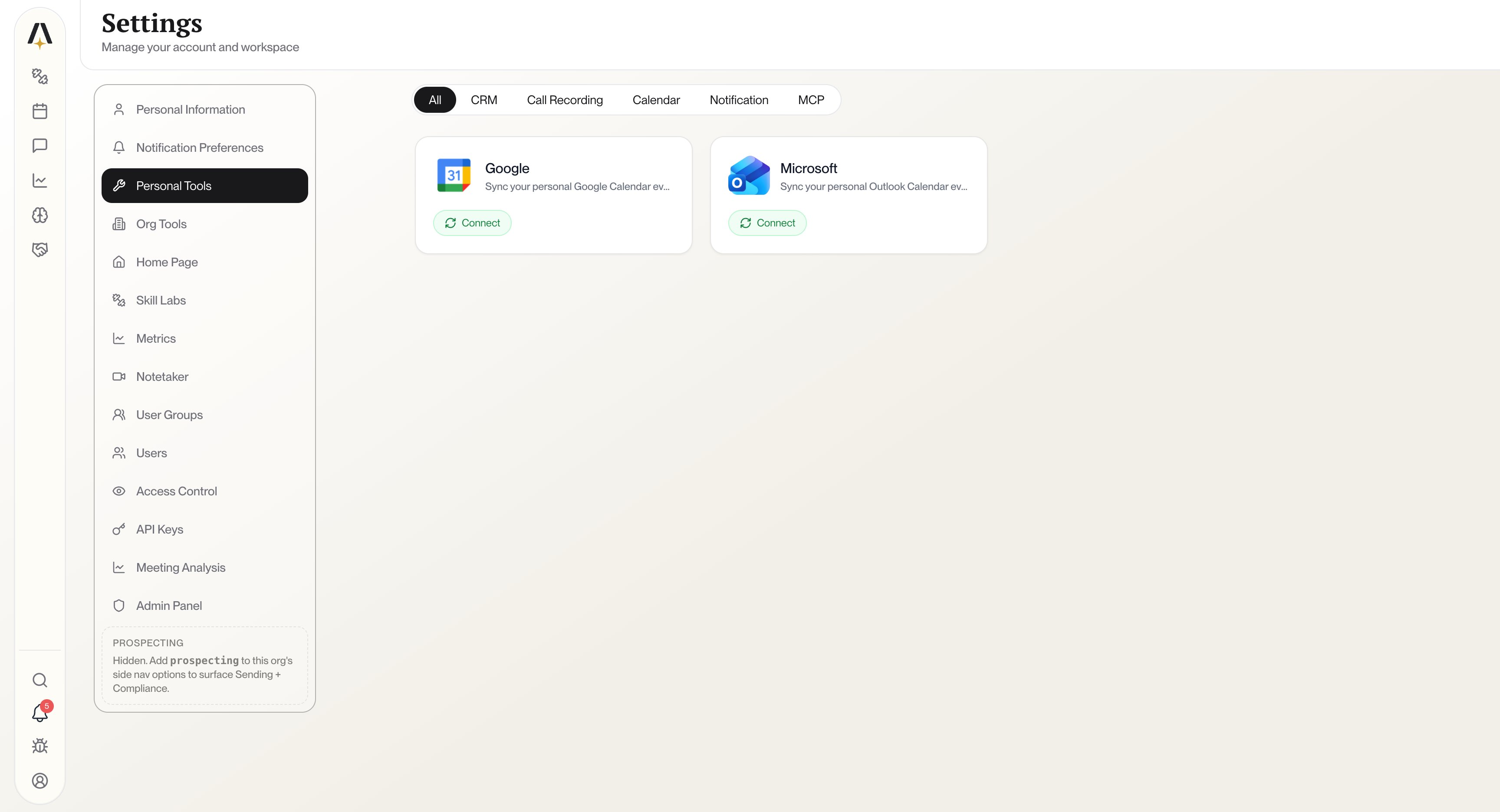
Go to Settings → Personal Tools and connect your Google Calendar or Outlook Calendar.
Settings → Personal Tools — click Connect on Google or Microsoft to link your calendar
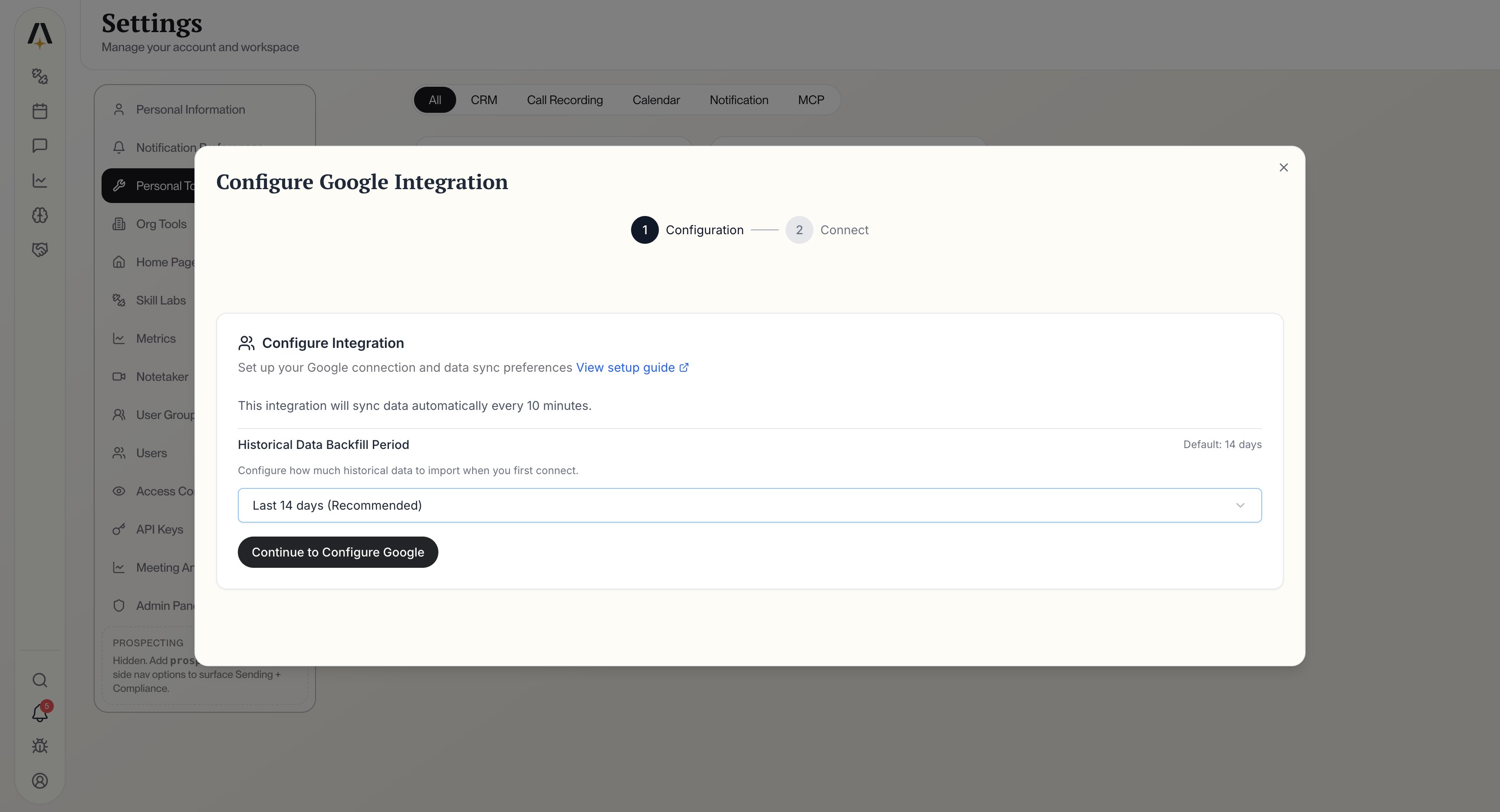
Click Connect on your calendar provider. You’ll see a configuration dialog where you can choose how much historical data to import.
Configure your Google Calendar integration — choose a backfill period and click Continue
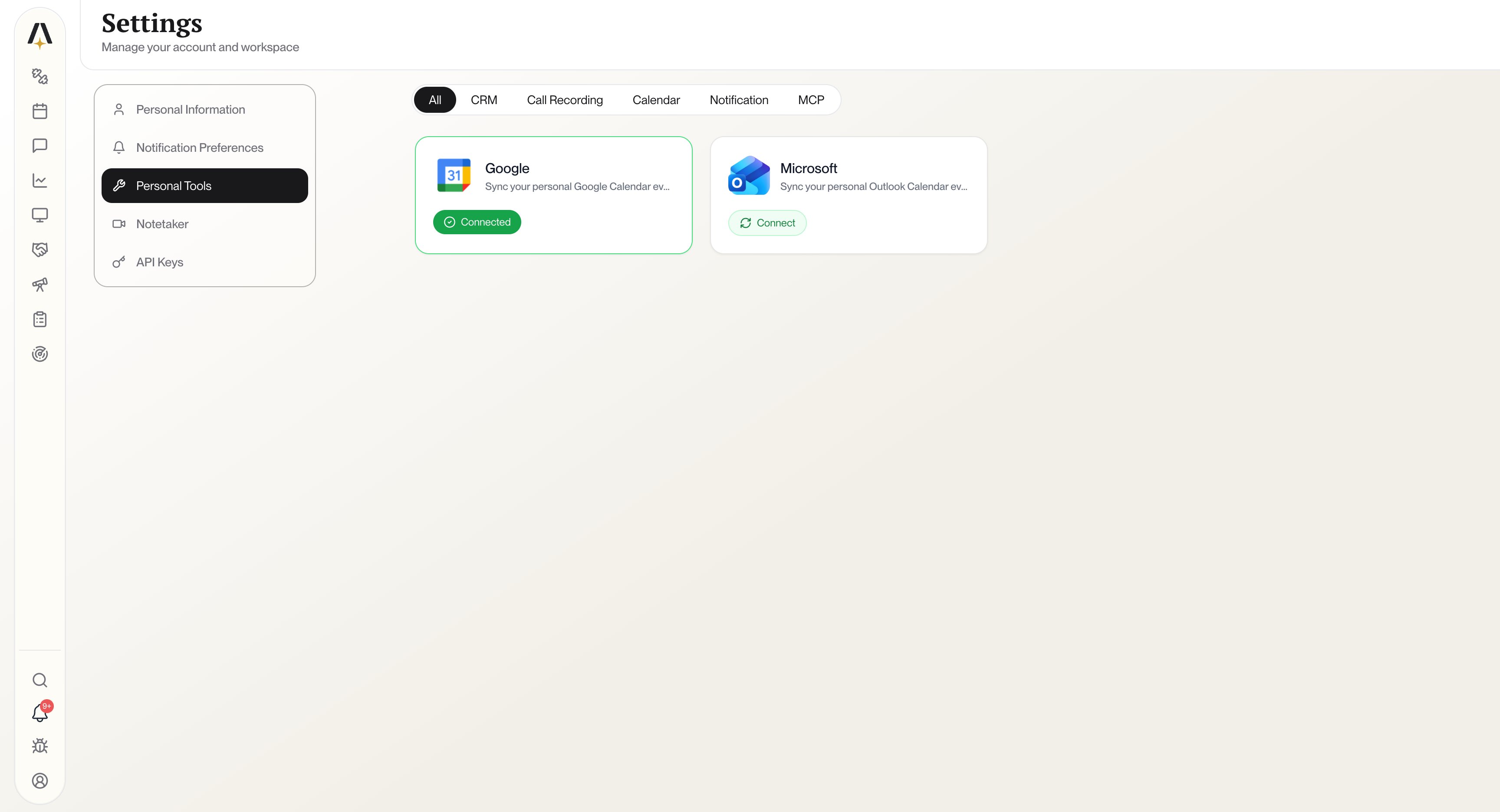
Select your preferred backfill period (default is Last 14 days), then click Continue to Configure Google. You’ll be redirected to sign in with your Google or Microsoft account and grant AmpUp access to your calendar.Once connected, you’ll see a green Connected badge on your calendar card.
Google Calendar connected successfully
3
Your meetings sync automatically
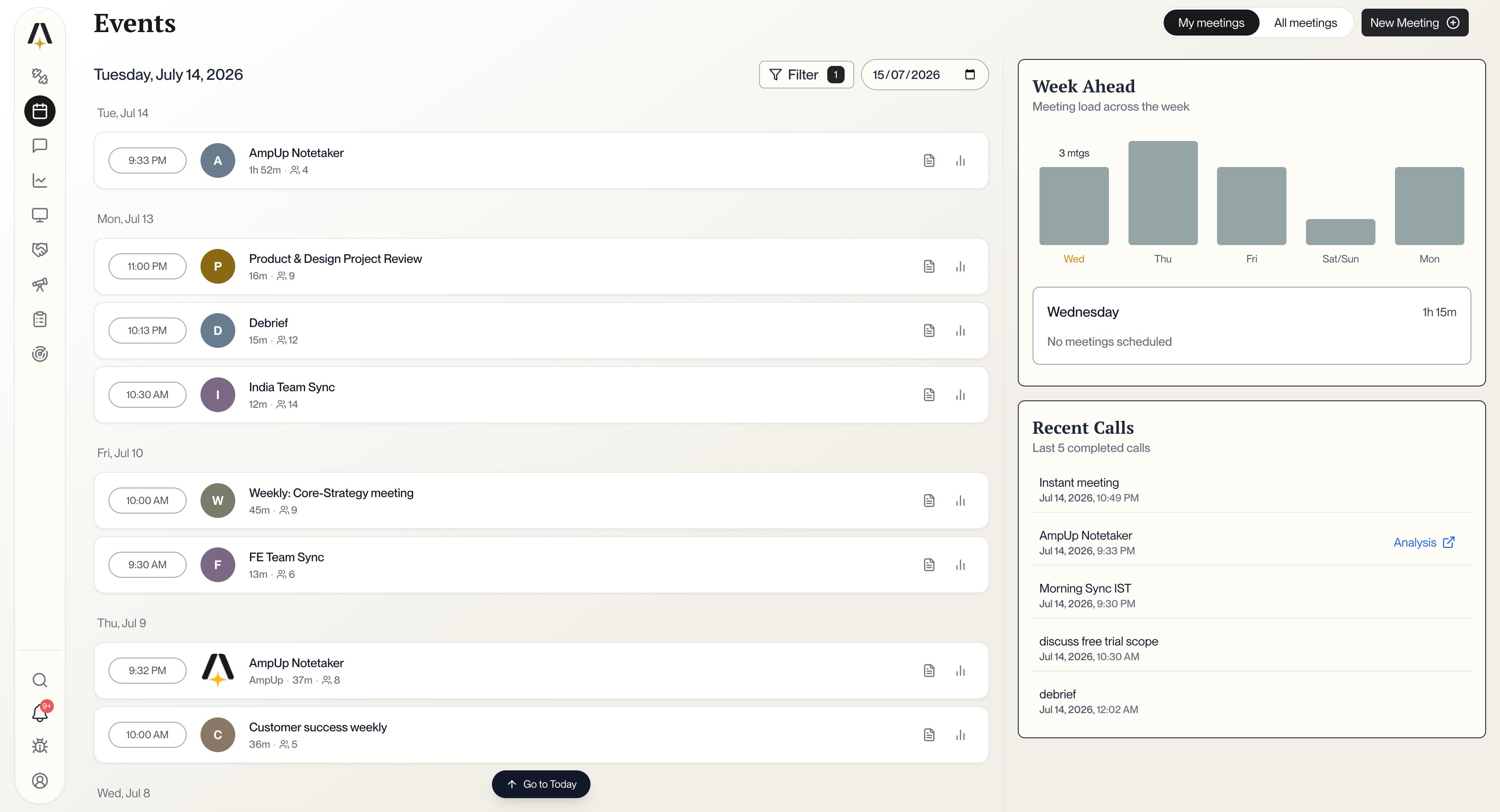
Within 30 minutes of connecting your calendar, all your upcoming meetings will appear on the Meetings page under the My meetings tab. The Notetaker will automatically join your future meetings.
Meetings page — your synced meetings appear under My meetings
From this page you can:
View upcoming meetings and past recordings
See the Week Ahead meeting load at a glance
Access pre-meeting briefings and post-meeting analysis for each call
Upload recordings manually with the New Meeting button
Do I need to invite the Notetaker to each meeting?
No. Once your calendar is connected, the Notetaker automatically joins all your meetings. No manual invites needed.
Can I exclude certain meetings from being recorded?
Yes. You can configure which meetings the Notetaker should skip from the Notetaker section in Settings.
How long does the initial calendar sync take?
Your meetings typically appear within 30 minutes of connecting your calendar. The Notetaker will start joining meetings from that point forward.
What if I use both Google and Outlook calendars?
You can connect both. AmpUp will sync meetings from all connected calendars.
Is my meeting data secure?
Yes. All recordings and transcripts are encrypted in transit and at rest. AmpUp is SOC 2 Type 2 certified and never shares your data with third parties.
{"docsConfig":{"$schema":"https://mintlify.com/docs.json","theme":"mint","name":"AmpUp Documentation","colors":{"primary":"#2563EB","light":"#3B82F6","dark":"#1E40AF"},"favicon":"https://mintcdn.com/ampup/1EWrNKsJLK8V4F34/favicon.svg?fit=max\u0026auto=format\u0026n=1EWrNKsJLK8V4F34\u0026q=85\u0026s=c7848aa67705c7851517122e69b67e6b","logo":{"light":"https://mintcdn.com/ampup/CfEu0QltGPzGd3og/logo/light.svg?fit=max\u0026auto=format\u0026n=CfEu0QltGPzGd3og\u0026q=85\u0026s=4fe7377c117cd632347db0b16517ab76","dark":"https://mintcdn.com/ampup/CfEu0QltGPzGd3og/logo/dark.svg?fit=max\u0026auto=format\u0026n=CfEu0QltGPzGd3og\u0026q=85\u0026s=87d6de0aada0425bff5b3f0cfc3bf5fe"},"navbar":{"links":[{"label":"Support","href":"mailto:support@ampup.ai"}],"primary":{"type":"button","label":"Get Started","href":"https://www.ampup.ai"}},"seo":{"metatags":{"og:type":"website","og:site_name":"AmpUp Documentation","twitter:card":"summary_large_image"},"indexing":"all"},"footer":{"socials":{"linkedin":"https://www.linkedin.com/company/ampup-ai"}},"styling":{"latex":false},"navigation":{"pages":[]}},"deployment":{"deploymentMetadataValue":{"subdomain":"ampup","hasAudioNarration":false,"actualSubdomain":"ampup","customDomains":["docs.ampup.ai"],"gitSource":{"type":"github","owner":"a79-ai","repo":"ampup-docs","deployBranch":"main","contentDirectory":"","isPrivate":true,"mountPath":"","label":""},"chroma":{"liveDeploymentHistoryId":"6ad5b154b9a0635706e669d1","collectionId":"646e87d0-3a51-4a72-94df-2852fcb04b48","schemaVersion":"v3","latestBuiltDeploymentHistoryId":"6ad5b154b9a0635706e669d1"},"entitlements":{},"buildId":"6ad5b154b9a0635706e669d1","clientVersion":"0.0.3966","searchFilterCounts":[{"language":"default","tag":"Documentation","count":38},{"language":"default","tag":"Integrations","count":32},{"language":"default","tag":"Developer","count":12},{"language":"default","tag":"Conversation Intelligence","count":9},{"language":"default","tag":"Chat Widget","count":4},{"language":"default","tag":"Getting Started","count":3},{"language":"default","tag":"CRM Platforms","count":3},{"language":"default","tag":"Meeting Platforms","count":2},{"language":"default","tag":"memstore","count":2},{"language":"default","tag":"Security","count":2}]},"assistantConfig":{"enableAskAiButton":false,"enableStarterQuestions":false,"enableAskAiSearchBar":true},"hasChatPermissions":false,"hasWebMcpPermissions":false,"toggles":[{"name":"kill-isr","enabled":true,"variant":{"name":"disabled","enabled":false,"feature_enabled":true},"impressionData":false},{"name":"agent-mintlify-slack","enabled":true,"variant":{"name":"disabled","enabled":false,"feature_enabled":true},"impressionData":false},{"name":"editor-v7-file-tree","enabled":true,"variant":{"name":"disabled","enabled":false,"feature_enabled":true},"impressionData":false},{"name":"agent-integrations-settings","enabled":true,"variant":{"name":"disabled","enabled":false,"feature_enabled":true},"impressionData":false},{"name":"automations-pr-grouping","enabled":true,"variant":{"name":"disabled","enabled":false,"feature_enabled":true},"impressionData":false},{"name":"custom-prefix","enabled":true,"variant":{"name":"disabled","enabled":false,"feature_enabled":true},"impressionData":false},{"name":"analytics-v7","enabled":true,"variant":{"name":"disabled","enabled":false,"feature_enabled":true},"impressionData":false},{"name":"user-flows-analytics","enabled":true,"variant":{"name":"disabled","enabled":false,"feature_enabled":true},"impressionData":false},{"name":"no-publish-flow","enabled":true,"variant":{"name":"disabled","enabled":false,"feature_enabled":true},"impressionData":false},{"name":"workos-onboarding","enabled":true,"variant":{"name":"disabled","enabled":false,"feature_enabled":true},"impressionData":false},{"name":"llms-txt-v2","enabled":true,"variant":{"name":"disabled","enabled":false,"feature_enabled":true},"impressionData":false},{"name":"pause-universal-search-reconcile","enabled":true,"variant":{"name":"disabled","enabled":false,"feature_enabled":true},"impressionData":false},{"name":"snapshot-serving-live","enabled":true,"variant":{"name":"disabled","enabled":false,"feature_enabled":true},"impressionData":false},{"name":"stripTemperatureMiddleware","enabled":true,"variant":{"name":"disabled","enabled":false,"feature_enabled":true},"impressionData":false},{"name":"per-site-search-delta","enabled":true,"variant":{"name":"disabled","enabled":false,"feature_enabled":true},"impressionData":false},{"name":"support-platform-pylon-zendesk","enabled":true,"variant":{"name":"disabled","enabled":false,"feature_enabled":true},"impressionData":false},{"name":"snapshot-serving","enabled":true,"variant":{"name":"disabled","enabled":false,"feature_enabled":true},"impressionData":false},{"name":"instant-rollback","enabled":true,"variant":{"name":"disabled","enabled":false,"feature_enabled":true},"impressionData":false},{"name":"granular-notifications-server","enabled":true,"variant":{"name":"disabled","enabled":false,"feature_enabled":true},"impressionData":false},{"name":"granular-notifications","enabled":true,"variant":{"name":"disabled","enabled":false,"feature_enabled":true},"impressionData":false},{"name":"editor-private-page-search","enabled":true,"variant":{"name":"disabled","enabled":false,"feature_enabled":true},"impressionData":false},{"name":"automations-fable","enabled":true,"variant":{"name":"disabled","enabled":false,"feature_enabled":true},"impressionData":false},{"name":"fixed-ai-action-pricing","enabled":true,"variant":{"name":"disabled","enabled":false,"feature_enabled":true},"impressionData":false},{"name":"automation-resolve-merge-conflict","enabled":true,"variant":{"name":"disabled","enabled":false,"feature_enabled":true},"impressionData":false},{"name":"scoped-publishing","enabled":true,"variant":{"name":"disabled","enabled":false,"feature_enabled":true},"impressionData":false},{"name":"mintql","enabled":true,"variant":{"name":"disabled","enabled":false,"feature_enabled":true},"impressionData":false},{"name":"page-level-analytics","enabled":true,"variant":{"name":"disabled","enabled":false,"feature_enabled":true},"impressionData":false},{"name":"editor-version-history-v2","enabled":true,"variant":{"name":"disabled","enabled":false,"feature_enabled":true},"impressionData":false},{"name":"editor-nav-generations","enabled":true,"variant":{"name":"disabled","enabled":false,"feature_enabled":true},"impressionData":false},{"name":"billing-page-v2","enabled":true,"variant":{"name":"disabled","enabled":false,"feature_enabled":true},"impressionData":false},{"name":"workspace-projects","enabled":true,"variant":{"name":"disabled","enabled":false,"feature_enabled":true},"impressionData":false},{"name":"assistant-v5","enabled":true,"variant":{"name":"disabled","enabled":false,"feature_enabled":true},"impressionData":false},{"name":"byok-sep-25","enabled":true,"variant":{"name":"disabled","enabled":false,"feature_enabled":true},"impressionData":false},{"name":"fork-pr-previews","enabled":true,"variant":{"name":"disabled","enabled":false,"feature_enabled":true},"impressionData":false},{"name":"revalidation-jwt","enabled":true,"variant":{"name":"disabled","enabled":false,"feature_enabled":true},"impressionData":false},{"name":"vite-origin","enabled":true,"variant":{"name":"disabled","enabled":false,"feature_enabled":true},"impressionData":false},{"name":"editor-agent-model-picker","enabled":true,"variant":{"name":"disabled","enabled":false,"feature_enabled":true},"impressionData":false},{"name":"billing-updated-9-15","enabled":true,"variant":{"name":"disabled","enabled":false,"feature_enabled":true},"impressionData":false},{"name":"hobby-abuse-scan","enabled":true,"variant":{"name":"disabled","enabled":false,"feature_enabled":true},"impressionData":false},{"name":"dashboard-inbox","enabled":true,"variant":{"name":"disabled","enabled":false,"feature_enabled":true},"impressionData":false}],"isAtlas":false,"googleFontsInlined":false},"customCss":[],"page":{"pagePath":"getting-started/notetaker","slug":"/getting-started/notetaker","pageMetadata":{"title":"AmpUp Notetaker","description":"Set up the AmpUp Notetaker to automatically record, transcribe, and analyze your meetings","icon":"microphone","href":"/getting-started/notetaker"},"description":{"compiledSource":"\"use strict\";\nconst {jsx: _jsx} = arguments[0];\nconst {useMDXComponents: _provideComponents} = arguments[0];\nfunction _createMdxContent(props) {\n const _components = {\n p: \"p\",\n ..._provideComponents(),\n ...props.components\n };\n return _jsx(_components.p, {\n children: \"Set up the AmpUp Notetaker to automatically record, transcribe, and analyze your meetings\"\n });\n}\nfunction MDXContent(props = {}) {\n const {wrapper: MDXLayout} = {\n ..._provideComponents(),\n ...props.components\n };\n return MDXLayout ? _jsx(MDXLayout, {\n ...props,\n children: _jsx(_createMdxContent, {\n ...props\n })\n }) : _createMdxContent(props);\n}\nreturn {\n default: MDXContent\n};\n","frontmatter":{},"scope":{}},"pageType":"default","mdx":{"mdxSource":{"compiledSource":"\"use strict\";const{Fragment:_Fragment,jsx:_jsx,jsxs:_jsxs}=arguments[0];const{useMDXComponents:_provideComponents}=arguments[0];function _createMdxContent(props){const _components={li:`li`,p:`p`,strong:`strong`,tbody:`tbody`,td:`td`,th:`th`,thead:`thead`,tr:`tr`,ul:`ul`,..._provideComponents(),...props.components},{Accordion,AccordionGroup,Card,CardGroup,Frame,Heading,Info,OptimizedImage,Step,Steps,Table}=_components;if(!Accordion)_missingMdxReference(`Accordion`,true);if(!AccordionGroup)_missingMdxReference(`AccordionGroup`,true);if(!Card)_missingMdxReference(`Card`,true);if(!CardGroup)_missingMdxReference(`CardGroup`,true);if(!Frame)_missingMdxReference(`Frame`,true);if(!Heading)_missingMdxReference(`Heading`,true);if(!Info)_missingMdxReference(`Info`,true);if(!OptimizedImage)_missingMdxReference(`OptimizedImage`,true);if(!Step)_missingMdxReference(`Step`,true);if(!Steps)_missingMdxReference(`Steps`,true);if(!Table)_missingMdxReference(`Table`,true);return _jsxs(_Fragment,{children:[_jsx(_components.p,{children:`The AmpUp Notetaker joins your meetings automatically, records them, and provides AI-powered analysis — coaching insights, action items, and meeting summaries — all without any manual effort.`}),`\n`,_jsx(Heading,{level:`2`,id:`how-it-works`,children:`How It Works`}),`\n`,_jsxs(Steps,{children:[_jsxs(Step,{title:`Your admin enables the Notetaker`,children:[_jsx(_components.p,{children:`An AmpUp admin enables the Notetaker for your organization. Once enabled, every user in the org can connect their calendar and start using it.`}),_jsx(Info,{children:_jsx(_components.p,{children:`If you don’t see the Notetaker option in your settings, ask your AmpUp admin to enable it for your organization.`})})]}),_jsxs(Step,{title:`Connect your calendar`,children:[_jsxs(_components.p,{children:[`Go to `,_jsx(_components.strong,{children:`Settings`}),` → `,_jsx(_components.strong,{children:`Personal Tools`}),` and connect your `,_jsx(_components.strong,{children:`Google Calendar`}),` or `,_jsx(_components.strong,{children:`Outlook Calendar`}),`.`]}),_jsx(Frame,{caption:`Settings → Personal Tools — click Connect on Google or Microsoft to link your calendar`,children:_jsx(OptimizedImage,{src:`https://mintcdn.com/ampup/jZqeS-mcrso5_f1-/images/notetaker/calendar-not-connected.png?fit=max\u0026auto=format\u0026n=jZqeS-mcrso5_f1-\u0026q=85\u0026s=d8855baf2ff81322835d974708573cc9`,alt:`Personal Tools settings showing Google and Microsoft calendar options with Connect buttons`,\"data-og-width\":`3456`,width:`3456`,\"data-og-height\":`1872`,height:`1872`,\"data-path\":`images/notetaker/calendar-not-connected.png`,\"data-optimize\":`true`,\"data-opv\":`3`,srcset:`https://mintcdn.com/ampup/jZqeS-mcrso5_f1-/images/notetaker/calendar-not-connected.png?w=280\u0026fit=max\u0026auto=format\u0026n=jZqeS-mcrso5_f1-\u0026q=85\u0026s=abb7b8faa836f8e02b4323e87a34493d 280w, https://mintcdn.com/ampup/jZqeS-mcrso5_f1-/images/notetaker/calendar-not-connected.png?w=560\u0026fit=max\u0026auto=format\u0026n=jZqeS-mcrso5_f1-\u0026q=85\u0026s=5d4107b34021f24f49479fe43ba22371 560w, https://mintcdn.com/ampup/jZqeS-mcrso5_f1-/images/notetaker/calendar-not-connected.png?w=840\u0026fit=max\u0026auto=format\u0026n=jZqeS-mcrso5_f1-\u0026q=85\u0026s=66d4b9c7420d16b748a1485e49053c21 840w, https://mintcdn.com/ampup/jZqeS-mcrso5_f1-/images/notetaker/calendar-not-connected.png?w=1100\u0026fit=max\u0026auto=format\u0026n=jZqeS-mcrso5_f1-\u0026q=85\u0026s=17456add3ec4081076d27225587cb206 1100w, https://mintcdn.com/ampup/jZqeS-mcrso5_f1-/images/notetaker/calendar-not-connected.png?w=1650\u0026fit=max\u0026auto=format\u0026n=jZqeS-mcrso5_f1-\u0026q=85\u0026s=40d515b7981e3a6774947612b7b24e1a 1650w, https://mintcdn.com/ampup/jZqeS-mcrso5_f1-/images/notetaker/calendar-not-connected.png?w=2500\u0026fit=max\u0026auto=format\u0026n=jZqeS-mcrso5_f1-\u0026q=85\u0026s=e373828ff13ccf6fb5802f513c5b5494 2500w`})}),_jsxs(_components.p,{children:[`Click `,_jsx(_components.strong,{children:`Connect`}),` on your calendar provider. You’ll see a configuration dialog where you can choose how much historical data to import.`]}),_jsx(Frame,{caption:`Configure your Google Calendar integration — choose a backfill period and click Continue`,children:_jsx(OptimizedImage,{src:`https://mintcdn.com/ampup/jZqeS-mcrso5_f1-/images/notetaker/google-configure.png?fit=max\u0026auto=format\u0026n=jZqeS-mcrso5_f1-\u0026q=85\u0026s=f397ef83bfa060f813cfaca3bbfd808d`,alt:`Configure Google Integration dialog showing historical data backfill period setting`,\"data-og-width\":`3456`,width:`3456`,\"data-og-height\":`1872`,height:`1872`,\"data-path\":`images/notetaker/google-configure.png`,\"data-optimize\":`true`,\"data-opv\":`3`,srcset:`https://mintcdn.com/ampup/jZqeS-mcrso5_f1-/images/notetaker/google-configure.png?w=280\u0026fit=max\u0026auto=format\u0026n=jZqeS-mcrso5_f1-\u0026q=85\u0026s=3d924b2e4d2f2c058cdce0d60cad4aa5 280w, https://mintcdn.com/ampup/jZqeS-mcrso5_f1-/images/notetaker/google-configure.png?w=560\u0026fit=max\u0026auto=format\u0026n=jZqeS-mcrso5_f1-\u0026q=85\u0026s=ea21283582ea26b34248c69ce360f78b 560w, https://mintcdn.com/ampup/jZqeS-mcrso5_f1-/images/notetaker/google-configure.png?w=840\u0026fit=max\u0026auto=format\u0026n=jZqeS-mcrso5_f1-\u0026q=85\u0026s=d8ebb7af9982c1dbe154bd83176b33a8 840w, https://mintcdn.com/ampup/jZqeS-mcrso5_f1-/images/notetaker/google-configure.png?w=1100\u0026fit=max\u0026auto=format\u0026n=jZqeS-mcrso5_f1-\u0026q=85\u0026s=ce30adaa221ce786ea23bb92f6367f72 1100w, https://mintcdn.com/ampup/jZqeS-mcrso5_f1-/images/notetaker/google-configure.png?w=1650\u0026fit=max\u0026auto=format\u0026n=jZqeS-mcrso5_f1-\u0026q=85\u0026s=5a9b35f2c910f9001619ab8a06a088b0 1650w, https://mintcdn.com/ampup/jZqeS-mcrso5_f1-/images/notetaker/google-configure.png?w=2500\u0026fit=max\u0026auto=format\u0026n=jZqeS-mcrso5_f1-\u0026q=85\u0026s=99fcadad71602fced86ad340ffc9449a 2500w`})}),_jsxs(_components.p,{children:[`Select your preferred backfill period (default is `,_jsx(_components.strong,{children:`Last 14 days`}),`), then click `,_jsx(_components.strong,{children:`Continue to Configure Google`}),`. You’ll be redirected to sign in with your Google or Microsoft account and grant AmpUp access to your calendar.`]}),_jsxs(_components.p,{children:[`Once connected, you’ll see a green `,_jsx(_components.strong,{children:`Connected`}),` badge on your calendar card.`]}),_jsx(Frame,{caption:`Google Calendar connected successfully`,children:_jsx(OptimizedImage,{src:`https://mintcdn.com/ampup/jZqeS-mcrso5_f1-/images/notetaker/calendar-connected.png?fit=max\u0026auto=format\u0026n=jZqeS-mcrso5_f1-\u0026q=85\u0026s=8cdbf6f435c34dc55e4073cc45679772`,alt:`Personal Tools settings showing Google calendar with Connected status`,\"data-og-width\":`3456`,width:`3456`,\"data-og-height\":`1872`,height:`1872`,\"data-path\":`images/notetaker/calendar-connected.png`,\"data-optimize\":`true`,\"data-opv\":`3`,srcset:`https://mintcdn.com/ampup/jZqeS-mcrso5_f1-/images/notetaker/calendar-connected.png?w=280\u0026fit=max\u0026auto=format\u0026n=jZqeS-mcrso5_f1-\u0026q=85\u0026s=4c3121d5bba1429663f00fe9a434ef17 280w, https://mintcdn.com/ampup/jZqeS-mcrso5_f1-/images/notetaker/calendar-connected.png?w=560\u0026fit=max\u0026auto=format\u0026n=jZqeS-mcrso5_f1-\u0026q=85\u0026s=487b0766fcc03e638120f2a7258d6069 560w, https://mintcdn.com/ampup/jZqeS-mcrso5_f1-/images/notetaker/calendar-connected.png?w=840\u0026fit=max\u0026auto=format\u0026n=jZqeS-mcrso5_f1-\u0026q=85\u0026s=be2c979b34122d25a67b8692369ac18a 840w, https://mintcdn.com/ampup/jZqeS-mcrso5_f1-/images/notetaker/calendar-connected.png?w=1100\u0026fit=max\u0026auto=format\u0026n=jZqeS-mcrso5_f1-\u0026q=85\u0026s=71e7d56b36e514e8b1649cb47aeb346d 1100w, https://mintcdn.com/ampup/jZqeS-mcrso5_f1-/images/notetaker/calendar-connected.png?w=1650\u0026fit=max\u0026auto=format\u0026n=jZqeS-mcrso5_f1-\u0026q=85\u0026s=5dedf08f2bb32343fd6a6c2e04f73c8b 1650w, https://mintcdn.com/ampup/jZqeS-mcrso5_f1-/images/notetaker/calendar-connected.png?w=2500\u0026fit=max\u0026auto=format\u0026n=jZqeS-mcrso5_f1-\u0026q=85\u0026s=faedc847a3a6b08dbae78bde9587da76 2500w`})})]}),_jsxs(Step,{title:`Your meetings sync automatically`,children:[_jsxs(_components.p,{children:[`Within `,_jsx(_components.strong,{children:`30 minutes`}),` of connecting your calendar, all your upcoming meetings will appear on the `,_jsx(_components.strong,{children:`Meetings`}),` page under the `,_jsx(_components.strong,{children:`My meetings`}),` tab. The Notetaker will automatically join your future meetings.`]}),_jsx(Frame,{caption:`Meetings page — your synced meetings appear under My meetings`,children:_jsx(OptimizedImage,{src:`https://mintcdn.com/ampup/jZqeS-mcrso5_f1-/images/notetaker/meetings-page.png?fit=max\u0026auto=format\u0026n=jZqeS-mcrso5_f1-\u0026q=85\u0026s=9ddf1a58720bd826f32c1283575dc6d0`,alt:`Meetings page showing synced meetings with Week Ahead overview and Recent Calls`,\"data-og-width\":`3456`,width:`3456`,\"data-og-height\":`1872`,height:`1872`,\"data-path\":`images/notetaker/meetings-page.png`,\"data-optimize\":`true`,\"data-opv\":`3`,srcset:`https://mintcdn.com/ampup/jZqeS-mcrso5_f1-/images/notetaker/meetings-page.png?w=280\u0026fit=max\u0026auto=format\u0026n=jZqeS-mcrso5_f1-\u0026q=85\u0026s=5236086b664a476d756392646ad59956 280w, https://mintcdn.com/ampup/jZqeS-mcrso5_f1-/images/notetaker/meetings-page.png?w=560\u0026fit=max\u0026auto=format\u0026n=jZqeS-mcrso5_f1-\u0026q=85\u0026s=8ec79d7fd572d9f9272f1c3c2aed58b4 560w, https://mintcdn.com/ampup/jZqeS-mcrso5_f1-/images/notetaker/meetings-page.png?w=840\u0026fit=max\u0026auto=format\u0026n=jZqeS-mcrso5_f1-\u0026q=85\u0026s=9137190c6852bde23398f8f7e472f2f7 840w, https://mintcdn.com/ampup/jZqeS-mcrso5_f1-/images/notetaker/meetings-page.png?w=1100\u0026fit=max\u0026auto=format\u0026n=jZqeS-mcrso5_f1-\u0026q=85\u0026s=65458811ecd161b19aff1eed6e779d53 1100w, https://mintcdn.com/ampup/jZqeS-mcrso5_f1-/images/notetaker/meetings-page.png?w=1650\u0026fit=max\u0026auto=format\u0026n=jZqeS-mcrso5_f1-\u0026q=85\u0026s=3611d79561fbc7a0339234d7119967fb 1650w, https://mintcdn.com/ampup/jZqeS-mcrso5_f1-/images/notetaker/meetings-page.png?w=2500\u0026fit=max\u0026auto=format\u0026n=jZqeS-mcrso5_f1-\u0026q=85\u0026s=35a1772536334ea0357618366861c7f1 2500w`})}),_jsx(_components.p,{children:`From this page you can:`}),_jsxs(_components.ul,{children:[`\n`,_jsx(_components.li,{children:`View upcoming meetings and past recordings`}),`\n`,_jsxs(_components.li,{children:[`See the `,_jsx(_components.strong,{children:`Week Ahead`}),` meeting load at a glance`]}),`\n`,_jsxs(_components.li,{children:[`Access `,_jsx(_components.strong,{children:`pre-meeting briefings`}),` and `,_jsx(_components.strong,{children:`post-meeting analysis`}),` for each call`]}),`\n`,_jsxs(_components.li,{children:[`Upload recordings manually with the `,_jsx(_components.strong,{children:`New Meeting`}),` button`]}),`\n`]})]})]}),`\n`,_jsx(Heading,{level:`2`,id:`what-you-get-after-each-meeting`,children:`What You Get After Each Meeting`}),`\n`,_jsx(_components.p,{children:`Once the Notetaker records a meeting, AmpUp automatically generates:`}),`\n`,_jsxs(CardGroup,{cols:2,children:[_jsx(Card,{title:`Meeting Summary`,icon:`file-lines`,children:_jsx(_components.p,{children:`A concise overview of what was discussed, key decisions made, and topics covered.`})}),_jsx(Card,{title:`Action Items`,icon:`list-check`,children:_jsx(_components.p,{children:`Automatically extracted follow-up tasks with owners, so nothing falls through the cracks.`})}),_jsx(Card,{title:`Coaching Insights`,icon:`graduation-cap`,children:_jsx(_components.p,{children:`AI-powered feedback on your performance — what went well and specific areas to improve.`})}),_jsx(Card,{title:`Full Transcript`,icon:`closed-captioning`,children:_jsx(_components.p,{children:`A complete, searchable transcript with speaker labels for easy reference.`})})]}),`\n`,_jsx(Heading,{level:`2`,id:`supported-platforms`,children:`Supported Platforms`}),`\n`,_jsx(_components.p,{children:`The AmpUp Notetaker works with:`}),`\n`,_jsxs(Table,{children:[_jsx(_components.thead,{children:_jsxs(_components.tr,{children:[_jsx(_components.th,{children:`Platform`}),_jsx(_components.th,{children:`Support`})]})}),_jsxs(_components.tbody,{children:[_jsxs(_components.tr,{children:[_jsx(_components.td,{children:_jsx(_components.strong,{children:`Google Meet`})}),_jsx(_components.td,{children:`✅ Fully supported`})]}),_jsxs(_components.tr,{children:[_jsx(_components.td,{children:_jsx(_components.strong,{children:`Zoom`})}),_jsx(_components.td,{children:`✅ Fully supported`})]}),_jsxs(_components.tr,{children:[_jsx(_components.td,{children:_jsx(_components.strong,{children:`Microsoft Teams`})}),_jsx(_components.td,{children:`✅ Fully supported`})]})]})]}),`\n`,_jsx(Heading,{level:`2`,id:`faq`,children:`FAQ`}),`\n`,_jsxs(AccordionGroup,{children:[_jsx(Accordion,{title:`Do I need to invite the Notetaker to each meeting?`,id:`do-i-need-to-invite-the-notetaker-to-each-meeting`,children:_jsx(_components.p,{children:`No. Once your calendar is connected, the Notetaker automatically joins all your meetings. No manual invites needed.`})}),_jsx(Accordion,{title:`Can I exclude certain meetings from being recorded?`,id:`can-i-exclude-certain-meetings-from-being-recorded`,children:_jsxs(_components.p,{children:[`Yes. You can configure which meetings the Notetaker should skip from the `,_jsx(_components.strong,{children:`Notetaker`}),` section in Settings.`]})}),_jsx(Accordion,{title:`How long does the initial calendar sync take?`,id:`how-long-does-the-initial-calendar-sync-take`,children:_jsx(_components.p,{children:`Your meetings typically appear within 30 minutes of connecting your calendar. The Notetaker will start joining meetings from that point forward.`})}),_jsx(Accordion,{title:`What if I use both Google and Outlook calendars?`,id:`what-if-i-use-both-google-and-outlook-calendars`,children:_jsx(_components.p,{children:`You can connect both. AmpUp will sync meetings from all connected calendars.`})}),_jsx(Accordion,{title:`Is my meeting data secure?`,id:`is-my-meeting-data-secure`,children:_jsx(_components.p,{children:`Yes. All recordings and transcripts are encrypted in transit and at rest. AmpUp is SOC 2 Type 2 certified and never shares your data with third parties.`})})]}),`\n`,_jsx(Heading,{level:`2`,id:`need-help`,children:`Need Help?`}),`\n`,_jsxs(CardGroup,{cols:2,children:[_jsx(Card,{title:`Contact Support`,icon:`envelope`,href:`mailto:support@ampup.ai`,children:_jsx(_components.p,{children:`Email our support team`})}),_jsx(Card,{title:`Schedule a Call`,icon:`phone`,href:`https://www.ampup.ai`,children:_jsx(_components.p,{children:`Talk to our team`})})]})]})}function MDXContent(props={}){const{wrapper:MDXLayout}={..._provideComponents(),...props.components};return MDXLayout?_jsx(MDXLayout,{...props,children:_jsx(_createMdxContent,{...props})}):_createMdxContent(props)}return{default:MDXContent};function _missingMdxReference(id,component){throw new Error(`Expected `+(component?`component`:`object`)+\" `\"+id+\"` to be defined: you likely forgot to import, pass, or provide it.\")}","frontmatter":{},"scope":{"config":{},"pageMetadata":{"title":"AmpUp Notetaker","description":"Set up the AmpUp Notetaker to automatically record, transcribe, and analyze your meetings","icon":"microphone","href":"/getting-started/notetaker"}}},"mdxSourceWithNoJs":null},"mdxExtracts":{"tableOfContents":[{"title":"How It Works","slug":"how-it-works","depth":2,"children":[]},{"title":"What You Get After Each Meeting","slug":"what-you-get-after-each-meeting","depth":2,"children":[]},{"title":"Supported Platforms","slug":"supported-platforms","depth":2,"children":[]},{"title":"FAQ","slug":"faq","depth":2,"children":[]},{"title":"Need Help?","slug":"need-help","depth":2,"children":[]}],"codeExamples":{}},"jsLinks":[],"subdomain":"ampup","siteName":"AmpUp Documentation","title":"AmpUp Notetaker - AmpUp Documentation","navMaps":{"firstHrefInVersion":{},"firstHrefInLanguage":{}},"lastModified":"2026-07-15T02:12:26.159Z","originalFileLocation":"getting-started/notetaker.mdx"},"headHtml":"\u003cscript data-mint-head>(function(){var d=document.documentElement,p=null;if(!p){try{p=localStorage.getItem(\"isDarkMode\")}catch(e){}if(p==='true')p='dark';else if(p==='false')p='light';if(p!=='light'\u0026\u0026p!=='dark'\u0026\u0026p!=='system')p=\"system\"}var r=p==='system'?(matchMedia(\"(prefers-color-scheme: dark)\").matches?'dark':'light'):p;d.classList.remove(r==='dark'?'light':'dark');d.classList.add(r);d.setAttribute(\"data-theme-preference\",p)})();\u003c/script>\u003cmeta data-mint-head name=\"description\" content=\"Set up the AmpUp Notetaker to automatically record, transcribe, and analyze your meetings\">\u003cmeta data-mint-head name=\"application-name\" content=\"AmpUp Documentation\">\u003cmeta data-mint-head name=\"generator\" content=\"Mintlify\">\u003clink data-mint-head rel=\"icon\" type=\"image/png\" sizes=\"192x192\" href=\"/mintlify-assets/_mintlify/favicons/ampup/PolsO9XPzGsTBcC4/_generated/favicon/android-chrome-192x192.png\" media=\"(prefers-color-scheme: light)\">\u003clink data-mint-head rel=\"apple-touch-icon\" type=\"image/png\" sizes=\"180x180\" href=\"/mintlify-assets/_mintlify/favicons/ampup/PolsO9XPzGsTBcC4/_generated/favicon/apple-touch-icon.png\">\u003clink data-mint-head rel=\"icon\" type=\"image/png\" sizes=\"16x16\" href=\"/mintlify-assets/_mintlify/favicons/ampup/PolsO9XPzGsTBcC4/_generated/favicon/favicon-16x16.png\" media=\"(prefers-color-scheme: light)\">\u003clink data-mint-head rel=\"icon\" type=\"image/png\" sizes=\"32x32\" href=\"/mintlify-assets/_mintlify/favicons/ampup/PolsO9XPzGsTBcC4/_generated/favicon/favicon-32x32.png\" media=\"(prefers-color-scheme: light)\">\u003clink data-mint-head rel=\"shortcut icon\" type=\"image/x-icon\" href=\"/mintlify-assets/_mintlify/favicons/ampup/PolsO9XPzGsTBcC4/_generated/favicon/favicon.ico\" media=\"(prefers-color-scheme: light)\">\u003clink data-mint-head rel=\"icon\" type=\"image/png\" sizes=\"192x192\" href=\"/mintlify-assets/_mintlify/favicons/ampup/PolsO9XPzGsTBcC4/_generated/favicon-dark/android-chrome-192x192.png\" media=\"(prefers-color-scheme: dark)\">\u003clink data-mint-head rel=\"icon\" type=\"image/png\" sizes=\"16x16\" href=\"/mintlify-assets/_mintlify/favicons/ampup/PolsO9XPzGsTBcC4/_generated/favicon-dark/favicon-16x16.png\" media=\"(prefers-color-scheme: dark)\">\u003clink data-mint-head rel=\"icon\" type=\"image/png\" sizes=\"32x32\" href=\"/mintlify-assets/_mintlify/favicons/ampup/PolsO9XPzGsTBcC4/_generated/favicon-dark/favicon-32x32.png\" media=\"(prefers-color-scheme: dark)\">\u003clink data-mint-head rel=\"shortcut icon\" type=\"image/x-icon\" href=\"/mintlify-assets/_mintlify/favicons/ampup/PolsO9XPzGsTBcC4/_generated/favicon-dark/favicon.ico\" media=\"(prefers-color-scheme: dark)\">\u003cmeta data-mint-head property=\"og:title\" content=\"AmpUp Notetaker - AmpUp Documentation\">\u003cmeta data-mint-head property=\"og:description\" content=\"Set up the AmpUp Notetaker to automatically record, transcribe, and analyze your meetings\">\u003cmeta data-mint-head property=\"og:site_name\" content=\"AmpUp Documentation\">\u003cmeta data-mint-head property=\"og:url\" content=\"https://docs.ampup.ai/getting-started/notetaker\">\u003cmeta data-mint-head property=\"og:type\" content=\"website\">\u003cmeta data-mint-head property=\"og:image\" content=\"https://ampup.mintlify.app/_mintlify/api/og/v2?division=Getting+Started\u0026amp;title=AmpUp+Notetaker\u0026amp;description=Set+up+the+AmpUp+Notetaker+to+automatically+record%2C+transcribe%2C+and+analyze+your+meetings\u0026amp;theme=670b8cb73b14903f77325bb4\u0026amp;signature=3739fbeeba770bdff3ecff88c28f1386a9e003b5cb7500c5d16f08758b640e66\">\u003cmeta data-mint-head property=\"og:image:width\" content=\"1200\">\u003cmeta data-mint-head property=\"og:image:height\" content=\"630\">\u003cmeta data-mint-head name=\"twitter:card\" content=\"summary_large_image\">\u003cmeta data-mint-head name=\"twitter:title\" content=\"AmpUp Notetaker - AmpUp Documentation\">\u003cmeta data-mint-head name=\"twitter:description\" content=\"Set up the AmpUp Notetaker to automatically record, transcribe, and analyze your meetings\">\u003cmeta data-mint-head name=\"twitter:image\" content=\"https://ampup.mintlify.app/_mintlify/api/og/v2?division=Getting+Started\u0026amp;title=AmpUp+Notetaker\u0026amp;description=Set+up+the+AmpUp+Notetaker+to+automatically+record%2C+transcribe%2C+and+analyze+your+meetings\u0026amp;theme=670b8cb73b14903f77325bb4\u0026amp;signature=3739fbeeba770bdff3ecff88c28f1386a9e003b5cb7500c5d16f08758b640e66\">\u003cmeta data-mint-head name=\"twitter:image:width\" content=\"1200\">\u003cmeta data-mint-head name=\"twitter:image:height\" content=\"630\">\u003cmeta data-mint-head name=\"msapplication-config\" content=\"/mintlify-assets/_mintlify/favicons/ampup/PolsO9XPzGsTBcC4/_generated/favicon/browserconfig.xml\">\u003cmeta data-mint-head name=\"apple-mobile-web-app-title\" content=\"AmpUp Documentation\">\u003cmeta data-mint-head name=\"msapplication-TileColor\" content=\"#2563EB\">\u003clink data-mint-head rel=\"canonical\" href=\"https://docs.ampup.ai/getting-started/notetaker\">\u003clink data-mint-head rel=\"alternate\" type=\"application/xml\" href=\"/sitemap.xml\">\u003clink data-mint-head rel=\"alternate\" type=\"text/markdown\" href=\"/getting-started/notetaker.md\">\u003cscript data-mint-head type=\"application/ld+json\">{\"@context\":\"https://schema.org\",\"@graph\":[{\"@type\":\"Organization\",\"@id\":\"https://docs.ampup.ai/#organization\",\"name\":\"AmpUp Documentation\",\"url\":\"https://docs.ampup.ai\",\"logo\":{\"@type\":\"ImageObject\",\"url\":\"https://mintcdn.com/ampup/CfEu0QltGPzGd3og/logo/light.svg?fit=max\u0026auto=format\u0026n=CfEu0QltGPzGd3og\u0026q=85\u0026s=4fe7377c117cd632347db0b16517ab76\"}},{\"@type\":\"WebSite\",\"@id\":\"https://docs.ampup.ai#website\",\"name\":\"AmpUp Documentation\",\"url\":\"https://docs.ampup.ai\",\"publisher\":{\"@id\":\"https://docs.ampup.ai/#organization\"}},{\"@type\":\"WebPage\",\"@id\":\"https://docs.ampup.ai/getting-started/notetaker#webpage\",\"url\":\"https://docs.ampup.ai/getting-started/notetaker\",\"name\":\"AmpUp Notetaker\",\"description\":\"Set up the AmpUp Notetaker to automatically record, transcribe, and analyze your meetings\",\"dateModified\":\"2026-07-15T02:12:26.159Z\",\"isPartOf\":{\"@id\":\"https://docs.ampup.ai#website\"},\"breadcrumb\":{\"@id\":\"https://docs.ampup.ai/getting-started/notetaker#breadcrumb\"}},{\"@type\":\"BreadcrumbList\",\"@id\":\"https://docs.ampup.ai/getting-started/notetaker#breadcrumb\",\"itemListElement\":[{\"@type\":\"ListItem\",\"position\":1,\"name\":\"Getting Started\",\"item\":\"https://docs.ampup.ai/introduction\"},{\"@type\":\"ListItem\",\"position\":2,\"name\":\"AmpUp Notetaker\",\"item\":\"https://docs.ampup.ai/getting-started/notetaker\"}]},{\"@type\":[\"Article\",\"TechArticle\"],\"@id\":\"https://docs.ampup.ai/getting-started/notetaker#article\",\"headline\":\"AmpUp Notetaker\",\"name\":\"AmpUp Notetaker\",\"description\":\"Set up the AmpUp Notetaker to automatically record, transcribe, and analyze your meetings\",\"url\":\"https://docs.ampup.ai/getting-started/notetaker\",\"mainEntityOfPage\":{\"@id\":\"https://docs.ampup.ai/getting-started/notetaker#webpage\"},\"dateModified\":\"2026-07-15T02:12:26.159Z\",\"publisher\":{\"@id\":\"https://docs.ampup.ai/#organization\"},\"isPartOf\":{\"@id\":\"https://docs.ampup.ai#website\"}}]}\u003c/script>\u003cscript data-mint-head type=\"application/ld+json\">{\"@context\":\"https://schema.org\",\"@type\":\"WebSite\",\"name\":\"AmpUp Documentation\",\"creator\":{\"@type\":\"Organization\",\"name\":\"Mintlify\",\"url\":\"https://mintlify.com\"}}\u003c/script>","siteName":"AmpUp Documentation","nav":{"global":null,"anchors":[{"anchor":"Documentation","icon":"book-open","tabs":[{"tab":"Documentation","groups":[{"group":"Getting Started","pages":[{"title":"Welcome to AmpUp","href":"/introduction"},{"title":"Quickstart","description":"Get AmpUp connected to your sales tools in minutes","href":"/getting-started/quickstart"},{"title":"AmpUp Notetaker","icon":"microphone","href":"/getting-started/notetaker"}]},{"group":"memstore","pages":[{"title":"Set up your org","description":"You've been made the admin of a memstore org: sign up from your invite email, then get your team in","icon":"rocket","href":"/memstore/admin-setup"},{"title":"Invite people and join an org","icon":"user-plus","href":"/memstore/invites"}]},{"group":"Security","pages":[{"title":"Single Sign-On (SSO)","icon":"key","href":"/security/sso"},{"title":"MCP Server Authentication","icon":"shield-keyhole","href":"/security/mcp-oauth"}]}]},{"tab":"Integrations","pages":[{"title":"Integrations","href":"/integrations/overview"}]},{"tab":"Chat Widget","pages":[{"title":"Chat Widget","href":"/ampup-widget/installation"}]},{"tab":"Developer","pages":[{"title":"Developer","href":"/developer/overview"}]}]},{"anchor":"Contact Support","href":"mailto:support@ampup.ai","icon":"envelope"}]},"title":"AmpUp Notetaker - AmpUp Documentation","buildId":"dpl_cadrRc5H9XQiJQbDFN5mcYRs2PAj","deploymentId":"dpl_cadrRc5H9XQiJQbDFN5mcYRs2PAj","dynamics":["07c022d89b","a74be98ba7"],"chunks":["Frame-B0bJ23PC.js","DynamicMarkdown-UGQuxDKp.js","zoom-image-lightbox-B0E5HDf_.js","lightbox-handle-r17bVUz3.js"]}