> ## Documentation Index
> Fetch the complete documentation index at: https://docs.ampup.ai/llms.txt
> Use this file to discover all available pages before exploring further.
# Fireflies
> Connect Fireflies to analyze your meeting recordings with AmpUp
Connect Fireflies.ai to AmpUp to import your meeting recordings, transcripts, and AI-generated insights. AmpUp's AI agents will analyze your sales conversations to provide personalized coaching and help your team close more deals.
## Prerequisites
Before connecting Fireflies, ensure you have:
Fireflies.ai account with API access
Admin permissions to generate API keys in Fireflies
AmpUp admin access for your organization
## What Data Syncs
### From Fireflies to AmpUp
| Data Type | Description |
| ----------------------- | --------------------------------------------------------------- |
| **Meeting Transcripts** | Full conversation transcripts with speaker identification |
| **Meeting Recordings** | Audio/video recordings from Zoom, Google Meet, Teams, and more |
| **AI Summaries** | Fireflies-generated meeting summaries and key insights |
| **Action Items** | Tasks and next steps automatically extracted from conversations |
| **Bites** | Important soundbites and highlights from meetings |
| **Analytics** | Talk time, sentiment, topics discussed, and engagement metrics |
| **Meeting Metadata** | Duration, date, title, platform, participants |
| **User & Team Data** | Team structure and member information |
AmpUp imports transcripts and analytics from the last 90 days during initial sync. New meetings sync automatically in real-time.
## Connect Fireflies
Fireflies uses API key authentication for a straightforward setup process.
Log into your Fireflies.ai account and navigate to **Settings** → **Integrations** → **Fireflies API**.
Click **Generate API Key** and copy the key.
Store your API key securely - it provides full access to your Fireflies data. You'll need this to connect to AmpUp.
In AmpUp, go to **Settings** → **Integrations** → **Fireflies**.
Click **Connect Fireflies**. AmpUp will prompt you to enter the **API Key** you generated from Fireflies. AmpUp securely stores this credential and uses it to access your Fireflies data.
Configure your integration preferences:
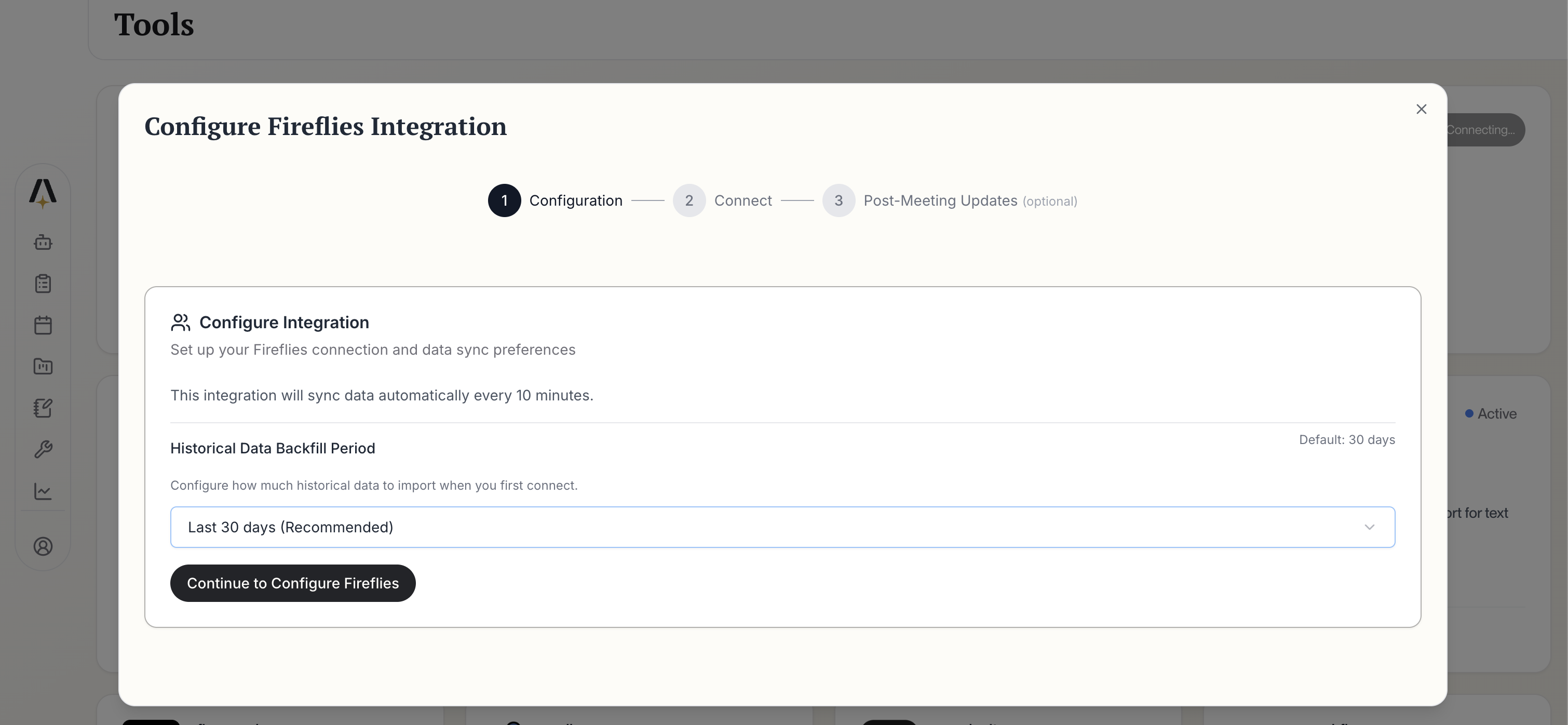 * **Historical Data Backfill Period**: Choose how far back to import (default: 30 days recommended)
* Data syncs automatically every 10 minutes after initial setup
Click **Continue to Configure Fireflies** to proceed.
Review which Fireflies data fields will sync to AmpUp:
* **Historical Data Backfill Period**: Choose how far back to import (default: 30 days recommended)
* Data syncs automatically every 10 minutes after initial setup
Click **Continue to Configure Fireflies** to proceed.
Review which Fireflies data fields will sync to AmpUp:
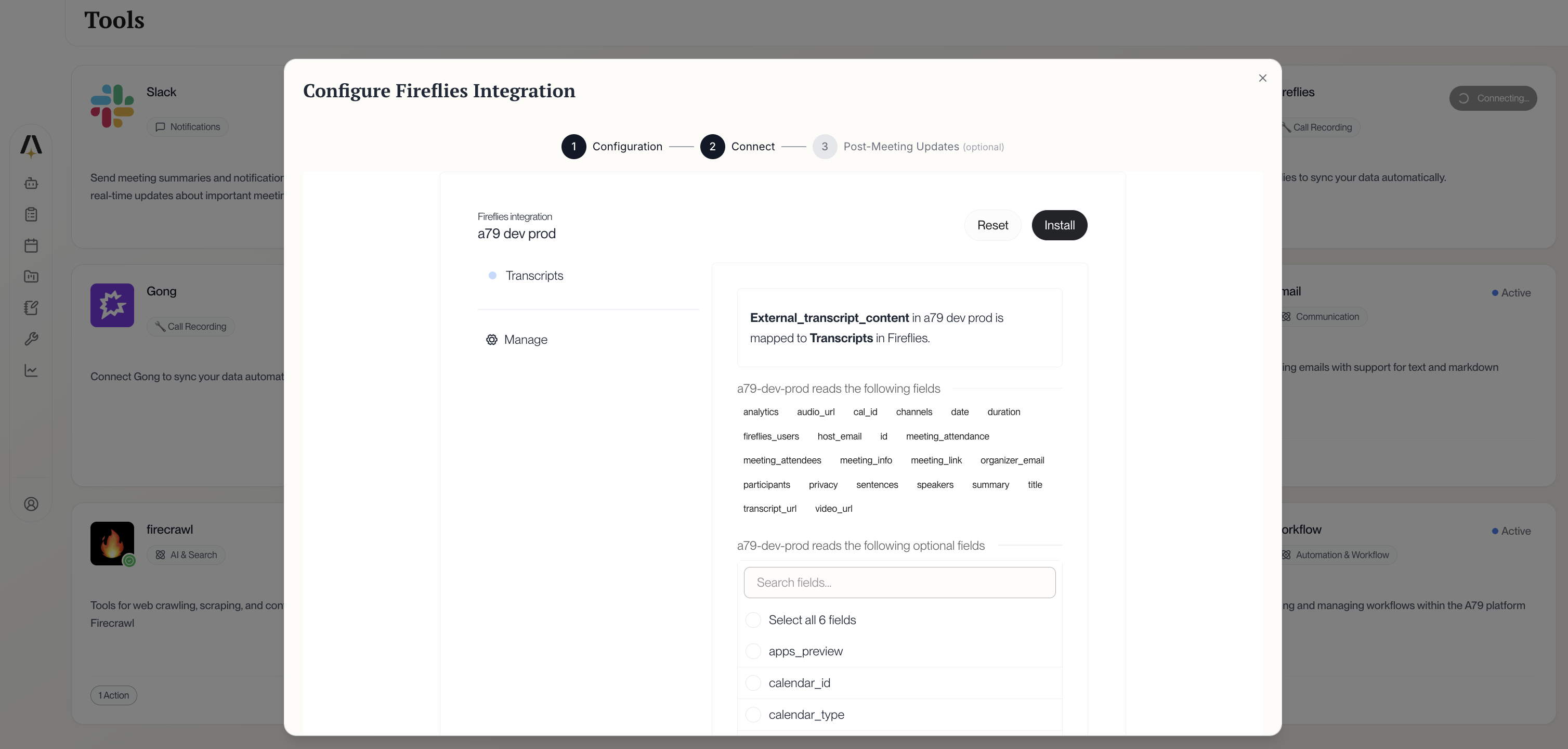 The integration syncs:
* **Required fields**: Transcripts, analytics, participants, speakers, summary, duration, dates
* **Optional fields**: Calendar info, apps preview, and custom fields
Click **Install** to complete the connection.
AmpUp will begin importing your Fireflies data. This typically takes 1-4 hours depending on your meeting volume.
## Configuration Options
### User & Team Filtering
Control which meetings are imported:
1. Go to **Settings** → **Integrations** → **Fireflies** → **Users**
2. Select specific users or entire teams
3. Changes apply to future meetings immediately
### Meeting Filters
Customize which meetings to sync:
| Filter | Default |
| ------------------------- | ------------------------------------ |
| **Minimum Duration** | 5 minutes |
| **External Participants** | Required (internal-only excluded) |
| **Meeting Type** | All scheduled and instant meetings |
| **Platforms** | All (Zoom, Meet, Teams, Webex, etc.) |
### Data Selection
Choose which data types to import:
| Data Type | Import | Use Case |
| --------------- | ------------- | ------------------------------ |
| **Transcripts** | ✅ Required | Core conversation analysis |
| **Summaries** | ✅ Recommended | Quick context for coaches |
| **Bites** | ✅ Recommended | Key moment identification |
| **Analytics** | ✅ Recommended | Talk ratio, engagement metrics |
| **Recordings** | Optional | Full audio/video playback |
### Historical Import Range
Select your initial import window:
* **30 days** - Quick setup, recent meetings
* **90 days** - Recommended for most teams
* **6 months** - Extended analysis history
* **1 year** - Comprehensive historical data
## How AmpUp Enhances Fireflies
AmpUp builds on Fireflies' analytics to deliver rep-specific coaching that addresses each seller's unique strengths and gaps.
Identify patterns across your top performers' conversations and scale those behaviors to the entire team.
Alex uses historical transcript data to prepare reps with account context and strategic talking points.
Maya creates targeted roleplay scenarios based on real objections and questions from your Fireflies recordings.
## Sync Status & Troubleshooting
### Check Sync Status
View your sync status at **Settings** → **Integrations** → **Fireflies** → **Sync Status**.
| Status | Meaning |
| ---------------- | ---------------------------------- |
| ✅ **Connected** | Integration is active and syncing |
| 🔄 **Importing** | Historical data import in progress |
| ✅ **Real-time** | Live sync enabled |
| ⚠️ **Delayed** | Processing backlog |
| ❌ **Error** | Connection issue - verify API key |
### Common Issues
* Wait for Fireflies to finish processing (typically 2-10 minutes after meeting ends)
* Verify the meeting meets minimum duration requirements
* Check that the user/team is included in sync settings
* Confirm the meeting had external participants (if filter is enabled)
* Ensure Fireflies bot successfully joined the meeting
* Verify you copied the complete API key without spaces
* Check that the API key hasn't been revoked in Fireflies
* Ensure the key was generated from an admin account
* Try generating a new API key and reconnecting
* Transcripts require clear audio - background noise can prevent transcription
* Very short meetings (under 2 minutes) may not be transcribed
* Check your Fireflies plan - free plans have monthly minute limits
* Verify recording was enabled during the meeting
* Analytics require the full transcript to be processed
* Some analytics (sentiment, topics) need at least 5 minutes of conversation
* Check that analytics are enabled in your Fireflies settings
Large meeting libraries take time to import. AmpUp processes meetings chronologically, starting with the most recent to provide value quickly.
## Fireflies Plan Requirements
### Free vs Paid Plans
| Feature | Free (800 min/month) | Pro | Business | Enterprise |
| ------------------- | -------------------- | --------- | --------- | ---------- |
| **Transcription** | 800 min/month | Unlimited | Unlimited | Unlimited |
| **Storage** | Limited | Unlimited | Unlimited | Unlimited |
| **AI Summaries** | ✅ | ✅ | ✅ | ✅ |
| **CRM Integration** | ✅ | ✅ | ✅ | ✅ |
| **Analytics** | Basic | Advanced | Advanced | Advanced |
| **API Access** | ✅ | ✅ | ✅ | ✅ |
All Fireflies plans include API access. However, free plans have monthly transcription limits that may affect data availability in AmpUp.
## Disconnect Fireflies
To disconnect the integration:
1. Go to **Settings** → **Integrations** → **Fireflies**
2. Click **Disconnect**
3. Confirm the disconnection
Disconnecting stops new meetings from syncing. Previously imported data remains in AmpUp unless you request deletion.
You can also revoke the API key in Fireflies:
1. Go to **Settings** → **Integrations** → **Fireflies API**
2. Find your API key and click **Revoke**
## FAQ
Fireflies is one of the most popular AI meeting assistants with 20M+ users and a generous free tier (800 min/month). It works alongside enterprise tools like Gong and Clari Copilot. AmpUp adds personalized coaching on top of any conversation intelligence platform.
Yes, but we recommend connecting only one to avoid duplicate meetings and confusion. AmpUp deduplicates based on meeting time and participants, but using a single source is cleaner.
Fireflies works with Zoom, Google Meet, Microsoft Teams, Webex, RingCentral, Aircall, and many other platforms. Any platform Fireflies can join, AmpUp can analyze.
New meetings typically appear within 15-30 minutes. Fireflies processes most meetings within 2-10 minutes of the call ending, then AmpUp imports the data.
No. Fireflies continues to record, transcribe, and summarize your meetings. AmpUp adds a coaching layer by analyzing those conversations to provide personalized feedback and training for your sales reps.
Yes. Generate a new API key in Fireflies settings, then update it in AmpUp's integration settings. The old key will stop working once revoked.
If you hit your monthly transcription limit on a free plan, new meetings won't be transcribed until the next billing cycle. Consider upgrading to a paid Fireflies plan for unlimited transcription.
Fireflies' Perplexity-powered search feature is separate from the transcription data that syncs to AmpUp. AmpUp focuses on the core transcript and analytics data for coaching purposes.
The integration syncs:
* **Required fields**: Transcripts, analytics, participants, speakers, summary, duration, dates
* **Optional fields**: Calendar info, apps preview, and custom fields
Click **Install** to complete the connection.
AmpUp will begin importing your Fireflies data. This typically takes 1-4 hours depending on your meeting volume.
## Configuration Options
### User & Team Filtering
Control which meetings are imported:
1. Go to **Settings** → **Integrations** → **Fireflies** → **Users**
2. Select specific users or entire teams
3. Changes apply to future meetings immediately
### Meeting Filters
Customize which meetings to sync:
| Filter | Default |
| ------------------------- | ------------------------------------ |
| **Minimum Duration** | 5 minutes |
| **External Participants** | Required (internal-only excluded) |
| **Meeting Type** | All scheduled and instant meetings |
| **Platforms** | All (Zoom, Meet, Teams, Webex, etc.) |
### Data Selection
Choose which data types to import:
| Data Type | Import | Use Case |
| --------------- | ------------- | ------------------------------ |
| **Transcripts** | ✅ Required | Core conversation analysis |
| **Summaries** | ✅ Recommended | Quick context for coaches |
| **Bites** | ✅ Recommended | Key moment identification |
| **Analytics** | ✅ Recommended | Talk ratio, engagement metrics |
| **Recordings** | Optional | Full audio/video playback |
### Historical Import Range
Select your initial import window:
* **30 days** - Quick setup, recent meetings
* **90 days** - Recommended for most teams
* **6 months** - Extended analysis history
* **1 year** - Comprehensive historical data
## How AmpUp Enhances Fireflies
AmpUp builds on Fireflies' analytics to deliver rep-specific coaching that addresses each seller's unique strengths and gaps.
Identify patterns across your top performers' conversations and scale those behaviors to the entire team.
Alex uses historical transcript data to prepare reps with account context and strategic talking points.
Maya creates targeted roleplay scenarios based on real objections and questions from your Fireflies recordings.
## Sync Status & Troubleshooting
### Check Sync Status
View your sync status at **Settings** → **Integrations** → **Fireflies** → **Sync Status**.
| Status | Meaning |
| ---------------- | ---------------------------------- |
| ✅ **Connected** | Integration is active and syncing |
| 🔄 **Importing** | Historical data import in progress |
| ✅ **Real-time** | Live sync enabled |
| ⚠️ **Delayed** | Processing backlog |
| ❌ **Error** | Connection issue - verify API key |
### Common Issues
* Wait for Fireflies to finish processing (typically 2-10 minutes after meeting ends)
* Verify the meeting meets minimum duration requirements
* Check that the user/team is included in sync settings
* Confirm the meeting had external participants (if filter is enabled)
* Ensure Fireflies bot successfully joined the meeting
* Verify you copied the complete API key without spaces
* Check that the API key hasn't been revoked in Fireflies
* Ensure the key was generated from an admin account
* Try generating a new API key and reconnecting
* Transcripts require clear audio - background noise can prevent transcription
* Very short meetings (under 2 minutes) may not be transcribed
* Check your Fireflies plan - free plans have monthly minute limits
* Verify recording was enabled during the meeting
* Analytics require the full transcript to be processed
* Some analytics (sentiment, topics) need at least 5 minutes of conversation
* Check that analytics are enabled in your Fireflies settings
Large meeting libraries take time to import. AmpUp processes meetings chronologically, starting with the most recent to provide value quickly.
## Fireflies Plan Requirements
### Free vs Paid Plans
| Feature | Free (800 min/month) | Pro | Business | Enterprise |
| ------------------- | -------------------- | --------- | --------- | ---------- |
| **Transcription** | 800 min/month | Unlimited | Unlimited | Unlimited |
| **Storage** | Limited | Unlimited | Unlimited | Unlimited |
| **AI Summaries** | ✅ | ✅ | ✅ | ✅ |
| **CRM Integration** | ✅ | ✅ | ✅ | ✅ |
| **Analytics** | Basic | Advanced | Advanced | Advanced |
| **API Access** | ✅ | ✅ | ✅ | ✅ |
All Fireflies plans include API access. However, free plans have monthly transcription limits that may affect data availability in AmpUp.
## Disconnect Fireflies
To disconnect the integration:
1. Go to **Settings** → **Integrations** → **Fireflies**
2. Click **Disconnect**
3. Confirm the disconnection
Disconnecting stops new meetings from syncing. Previously imported data remains in AmpUp unless you request deletion.
You can also revoke the API key in Fireflies:
1. Go to **Settings** → **Integrations** → **Fireflies API**
2. Find your API key and click **Revoke**
## FAQ
Fireflies is one of the most popular AI meeting assistants with 20M+ users and a generous free tier (800 min/month). It works alongside enterprise tools like Gong and Clari Copilot. AmpUp adds personalized coaching on top of any conversation intelligence platform.
Yes, but we recommend connecting only one to avoid duplicate meetings and confusion. AmpUp deduplicates based on meeting time and participants, but using a single source is cleaner.
Fireflies works with Zoom, Google Meet, Microsoft Teams, Webex, RingCentral, Aircall, and many other platforms. Any platform Fireflies can join, AmpUp can analyze.
New meetings typically appear within 15-30 minutes. Fireflies processes most meetings within 2-10 minutes of the call ending, then AmpUp imports the data.
No. Fireflies continues to record, transcribe, and summarize your meetings. AmpUp adds a coaching layer by analyzing those conversations to provide personalized feedback and training for your sales reps.
Yes. Generate a new API key in Fireflies settings, then update it in AmpUp's integration settings. The old key will stop working once revoked.
If you hit your monthly transcription limit on a free plan, new meetings won't be transcribed until the next billing cycle. Consider upgrading to a paid Fireflies plan for unlimited transcription.
Fireflies' Perplexity-powered search feature is separate from the transcription data that syncs to AmpUp. AmpUp focuses on the core transcript and analytics data for coaching purposes.